Crazy M1neWorld
Description
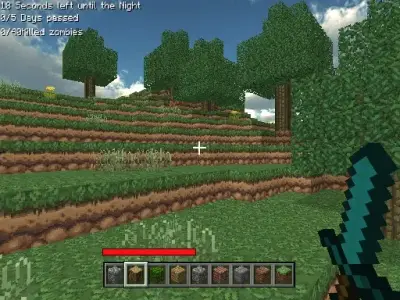
Crazy M1neWorld is a popular sandbox simulation game that offers players a vast, open-ended environment for creative expression. You can build your own home, design unique structures, and shape the landscape exactly how you envision it. Furthermore, the game allows for offline progress, which means you can save your hard work to revisit later. Crazy M1neWorld provides a clean, distraction-free experience, therefore making it the perfect choice for enthusiasts seeking pure building fun.
Interaction within the game is intuitive, as players use blocks to manipulate the environment in three dimensions. You can place materials to construct massive fortresses or intricate landscapes at your own pace. Additionally, the game utilizes a simple click-based interface to ensure that every player can easily master the building mechanics. As a result, you will find that creating complex structures becomes an incredibly rewarding process, allowing your imagination to truly run wild during every session.
Beyond that, the game introduces a thrilling survival mode that pits you against dangerous zombies once night falls. You must prepare your defenses during the daylight hours, because hiding is essential for survival when the sun goes down. Crazy M1neWorld effectively combines creative building with intense survival elements, providing a balanced challenge for every player who enters this immersive blocky universe.
How to Play Crazy M1neWorld
Select your building blocks from the inventory menu. Aim your cursor at the ground or existing structures to place items. Use the movement keys to navigate through the environment. Gather resources to fortify your base before sunset. Hide inside your secure home once the zombies appear to stay alive.
Controls
Keyboard: Use WASD to move, Space to jump, and E to open the inventory.
Mouse: Use the left click to place blocks and the right click to remove them.