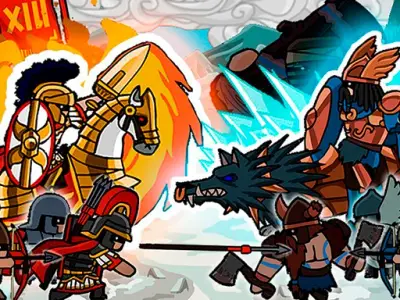
Ancient Wars: Caesar is a strategy game that challenges your tactical thinking. In this immersive experience, you lead a powerful army to fight for total supremacy on the battlefield. The game, moreover, takes you to a world of epic encounters where planning and resource management remain essential. Consequently, you must control various units, including warriors, archers, and generals, to destroy enemy troops and crush their base effectively. Your primary objective, therefore, is to achieve victory through superior battlefield positioning.
Players, furthermore, interact with the game by managing gold resources carefully. At the beginning of each level, you receive a budget that you must use to hire soldiers. It is important, however, to choose units like warriors or archers based on their specific costs and combat features. You must strategize about who to send into the front lines first. Additionally, you earn more gold by destroying enemies, which allows you to hire new reinforcements or deploy vital abilities.
The game also includes a progression system that gives you a reason to keep going. As you conquer each stage, you can unlock better support units to bolster your defense. This, in particular, adds depth to every skirmish you face. Ultimately, Ancient Wars: Caesar provides a satisfying challenge for those who enjoy tactical depth, as every decision you make directly impacts your survival against the enemy forces.
Frequently asked questions
How do I get started with Ancient Wars: Caesar?
Manage your starting gold wisely to hire soldiers. Select warriors, archers, or generals for your army. Send your troops out to battle the enemy. Destroy enemy units to earn additional gold. Finally, concentrate your forces to defeat the enemy base and clear the level.
How do I control Ancient Wars: Caesar?
Mouse: Click on unit icons to hire them for your army in Ancient Wars: Caesar. Mouse: Use the mouse to navigate menus and deploy soldiers onto the battlefield.
Can I play Ancient Wars: Caesar on mobile?
Yes. The game Ancient Wars: Caesar runs in a mobile or desktop browser (Desktop and Mobile). It works best in landscape orientation. It is also free, so there is nothing to pay for.
Something is wrong with the game Ancient Wars: Caesar. Who can I tell?
Please press the Report Problem button under the game and tell us what happened. We check every report.
Looking for more games like Ancient Wars: Caesar?
See all categories to find more.